RSHTECH
✓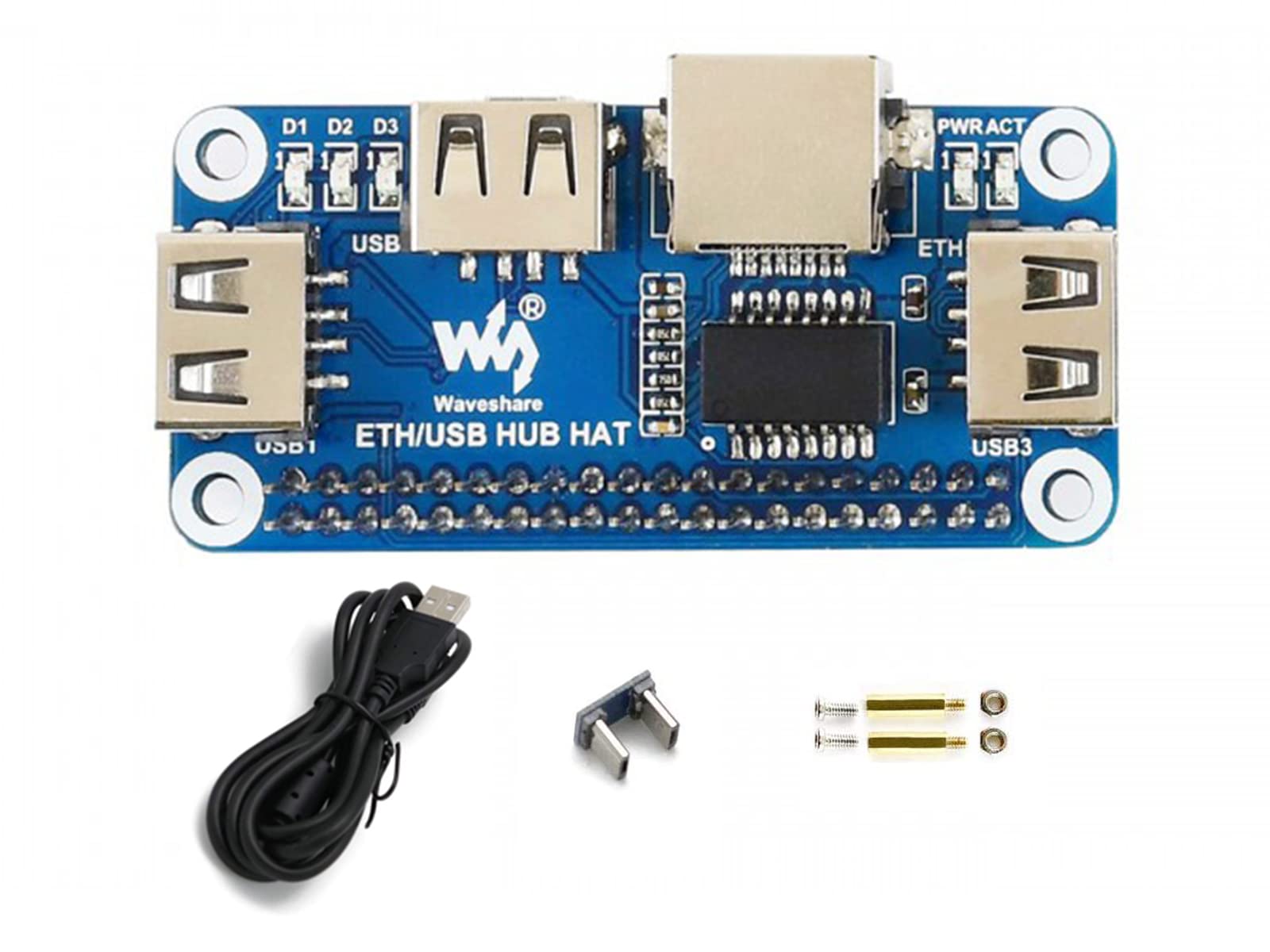
This Raspberry Pi hub HAT provides more USB capability to your Pi, plus a RJ45 Ethernet port, which is great when you need a stable wired Ethernet connection. It can work with various versions of the Pi, and the size of the board is designed to perfectly fit the Zero / Zero W / Zero WH. Features 1. 3x USB ports, compatible with USB2.0/1.1 2. 1x RJ45 10/100M port, based on the RTL8152B Ethernet chip 3. Onboard multi indicators, for monitoring the status of power, Ethernet, and each USB port What's on Board 1. Raspberry Pi GPIO interface: for connecting Raspberry Pi 2. USB extended ports: USB1~USB3 3. RJ45 port: 10/100M Ethernet interface 4. USB HUB interface (bottom): for connecting the HUB to the Raspberry Pi USB port Raspberry Pi Zero / Zero W / Zero WH: connected via Micro USB connector Raspberry Pi B+ / 2B / 3B / 3B+ /4B: connected via Micro USB cable 5. TS8121A: Ethernet wave filter 6. RTL8152B: 10/100M Ethernet chip 7. FE1.1S: USB HUB chip 8. LED indicators: PWR: power indicator ACT: Ethernet indicator D1~D3: dedicated indicator for USB1~USB3 respectively How to use it 1. Insert the ETH/USB HUB HAT to Raspberry Pi. Connect USB interface of Raspberry Pi to micro USB interface of ETH/USB HUB HAT 2. Connect Network cable to RJ45 interface of ETH/USB HUB HAT 3. Power on Raspberry Pi. PWR indicator lights on and ACT indicator is flashing. Now you can check the network and USB ports 4. When USB devices are connected to USB1~USB3 ports, related LED D1-D3 light on Specifications 1. Operating voltage: 5V 2. Dimension: 65mm × 30mm 3. Mounting hole size: 3.0mm Package Content 1. ETH/USB HUB HAT x1 2. Micro USB connector x1 3. Micro USB cable x1 4. RPi screws pack (2pcs) x1 Development Resources https://www.waveshare.com/wiki/ETH/USB_HUB_HAT?Amazon
Customer reviews
10 Trustpilot reviews total, with 2 shown at a time.
I wrote to Bigamart's customer support and they accompanied the process of reshipping the item until it finally arrived. I felt a genuine effort to solve the problem till it was finally solved.
The package was here in Australia from England in a few days — so quick! Something was missing and they refunded it straight away. Pretty happy with these guys.
You might also like