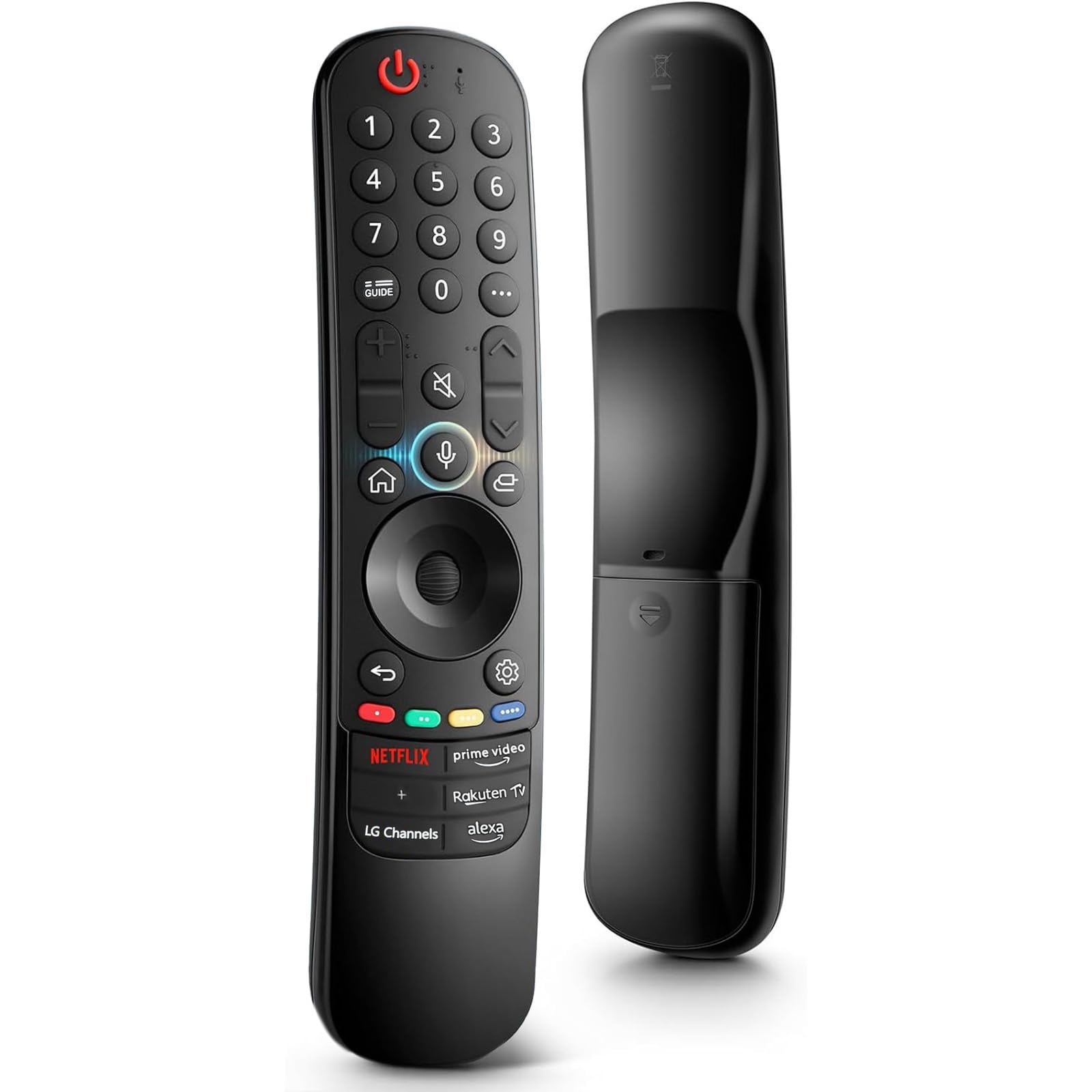

Magic Remote Control for L-G Smart TV Bluetooth Voice Remote Control Replace AN-MR21GA MR22GA MR23GA with Alexa Voice and Pointer Function
About this item
- 【Comapatible Models】:AN-MR18BA, AN-MR19BA, AN-MR20GA,AN-MR21GA,AN-MR21GC,AN-MR22GA,AN-MR23GA,AN-MR650A,AN-MR650B,AN-MR650G,AN-MR650,AKB74915304,AKB74915305,AKB75095307,AKB75375604,AKB75675304,AKB75675313,AKB76037601
- 【TV Compatibility】:43UN7000PUB,43UQ7070ZUD,43UQ7070ZUM,43UQ7590PUB,43UQ7590PUK,43UQ8000AUB,43UQ8000AUK,43UQ9000PUD,50NANO75UQA,50NANO80AQA,50QNED80AQA,50QNED80UQA,50UQ7070ZUE,50UQ7070ZUN,50UQ757OPUA,50UQ7570PUJ,50UQ7570PUJ,50UQ7590PUB,50UQ7590PUK,50UQ8000AUB,50UQ8000AUK,50UQ9000PUD,55NANO75UQA,55NANO80AQA,55QNED80AQA,55QNED80UQA,55QNED85AQA,55QNED85UQA,55UQ7070ZUE,55UQ7070ZUN,55UQ7570PUA,55UQ7570PUJ55UQ7590PUB,55UQ7590PUK,55UQ8000AUB,55UQ8000AUK
- 【Voice Control】New upgrade remote comes with 6 shortcut buttons: NETFLX, Prime Video, +, LG Channels, Alexa, Rakuten Tv, access into your favorite content in on click! Purchase it now and use your voice to search and streamline millions of movies, TV series and music!
- 【How to Pair】Turn on the TV and insert 2x AA batteries for lg remote. After about 20 seconds, point the remote toward the TV, then press the Wheel (OK). The remote control will be registered automatically, and the pairing completion message is displayed on the TV screen.
- 【Purchase Instructions】:With point, click, scroll functions, you can select the functions easily by moving and clicking the curson. If your LG TV does not support the voice function, it may cause some of the buttons on this remote not to work! (Note:NOT including battery)
Product description
New upgrade remot: New upgrade remote comes with 6 shortcut buttons: NETFLX, Prime Video, +, LG Channels, Alexa, Rakuten Tv, access into your favorite content in on click! If your LG TV does not support the voice function, it may cause some of the buttons on this remote not to work! Pair With Your TV Steps: Put batteries into the Magic Remote and turn the TV on. Point the Magic Remote at your TV and press the Wheel (OK) on the remote control. When the pointer is not working, press and hold the "GUIDE" button for more than 5 seconds to disconnect and re-register the motion sensor remote control at the same time. (Using a new magic remote control, or a magic remote control for another TV, this pairing process is required before use) Note: This product is not the original remote control, and cannot replace the original remote control 100%, but it can basically realize the functions of the original remote control. Please consider it clearly before placing an order.
Product details
Customer reviews
What customers say about Bigamart
10 Trustpilot reviews total, with 2 shown at a time.
I wrote to Bigamart's customer support and they accompanied the process of reshipping the item until it finally arrived. I felt a genuine effort to solve the problem till it was finally solved.
The package was here in Australia from England in a few days — so quick! Something was missing and they refunded it straight away. Pretty happy with these guys.
You might also like